
Overview
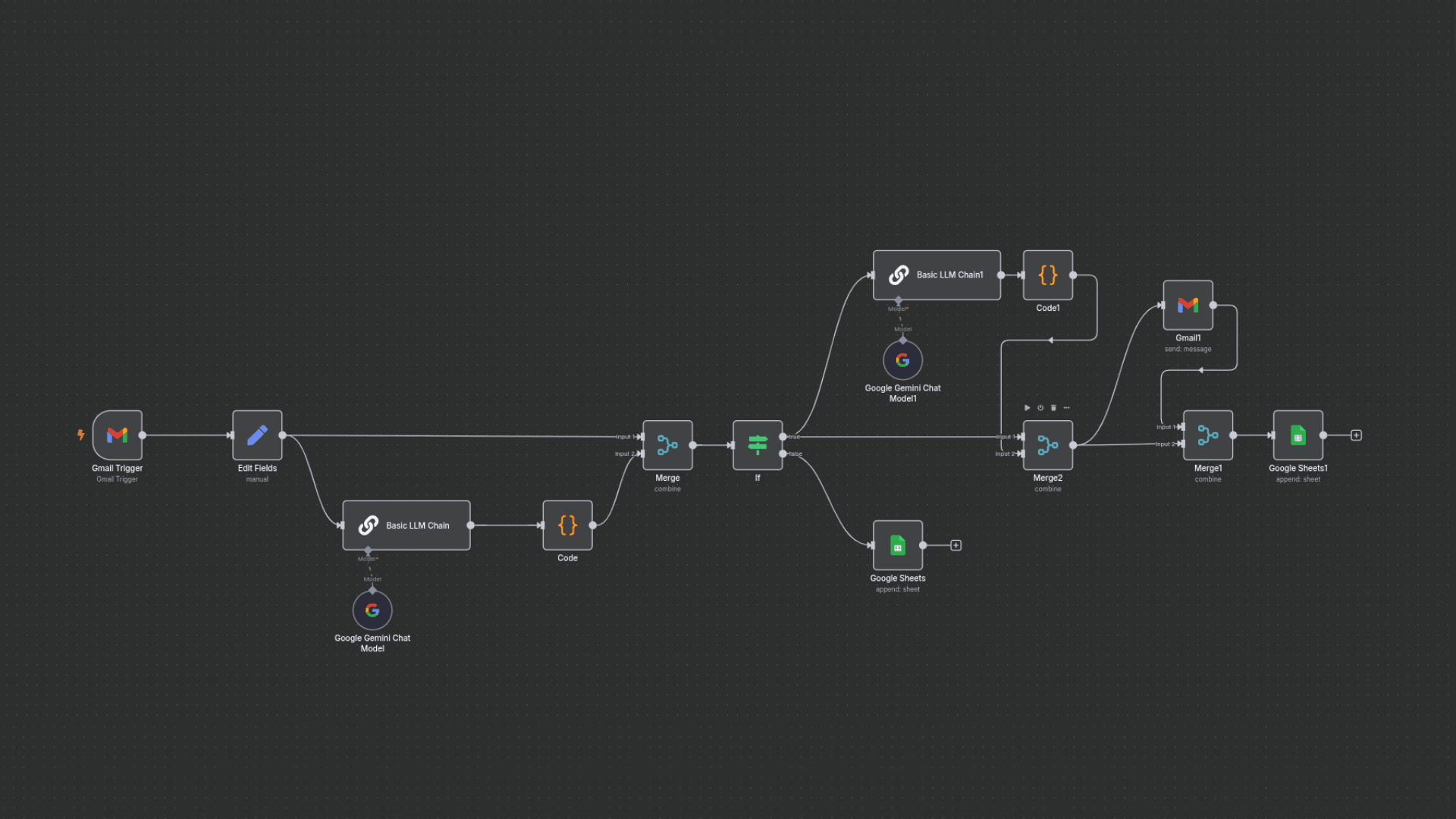
An n8n workflow that automatically classifies incoming Gmail emails using Gemini, then takes action by archiving spam, logging summaries in Google Sheets, or generating replies for sales and support emails.
The Problem
Businesses waste hours daily sorting emails, missing urgent support requests or sales leads. Manual replies are inconsistent, and critical emails often get buried in spam.
Technical Solution
System Architecture
- •n8n workflow with event-triggered Gmail API integration
- •Gemini nodes for 2-stage processing: classification, then reply generation
- •Google Sheets as a lightweight database for audit logs
- •Conditional logic for email routing (spam/support/sales/other)
Tools
n8n, Gemini
Triggers
Gmail push notifications
Data Storage
Google Sheets
Results & Impact
4
email routes: spam, support, sales, other
2-stage
Gemini: classify, then draft a reply
Sheets
log of every processed email
Lessons Learned
Prompt Engineering Matters
Fine-tuned Gemini prompts reduced misclassification errors.
n8n Limitations
Hit API rate limits with high email volumes, solved by adding delay nodes.
Sheets as a Database
Google Sheets sufficed for logging but would scale poorly at high volume.