
Overview
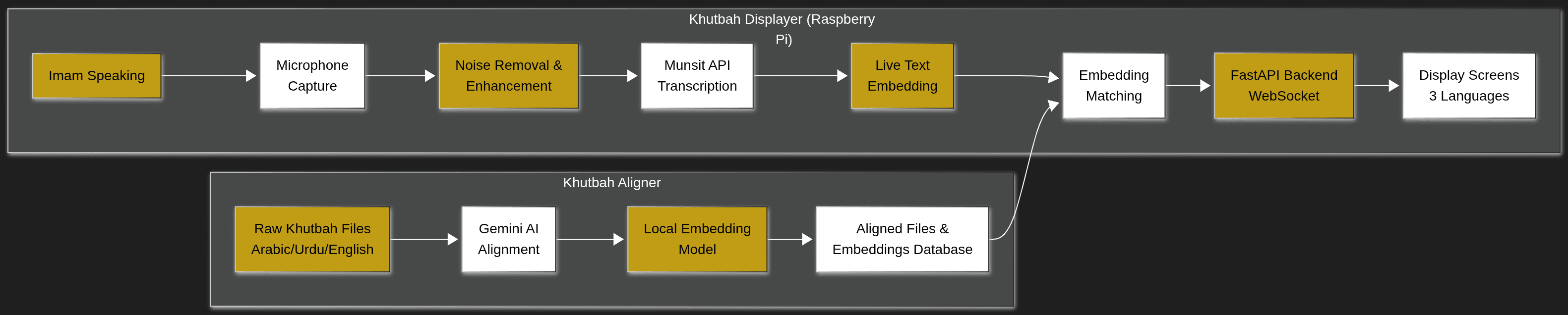
Mosque screens needed to show the live Friday sermon in Arabic, Urdu and English. The client wanted a system light enough to later run on low-cost hardware and become a product. I built two parts: an Aligner that prepares the sermon text, and a Displayer that follows the imam live.
The Problem
Free speech-to-text translation was the obvious approach, but it failed. Whisper (small) and Vosk were not accurate enough for Arabic on light hardware. The key insight: the sermon text is issued in advance and is the same across mosques. So the problem became matching live speech to known text, not translating from scratch.
Technical Solution
System Architecture
- •Aligner (Streamlit): Gemini splits the official sermon into sentence-level Arabic, Urdu and English pairs
- •A person reviews the aligned pairs before they are used
- •multilingual-e5-base (int8) embeddings for fast, CPU-only matching
- •Displayer (FastAPI): live audio goes through custom noise reduction and gain, then Munsit ASR
- •Each transcribed chunk is matched to the stored Arabic segments; a line is shown only above a confidence threshold
- •Lightweight HTML display updated over WebSockets
Backend
FastAPI, WebSockets
Speech to text
Munsit API
Matching
multilingual-e5-base (int8)
Alignment
Gemini + human review
Results & Impact
3
languages shown together
2
parts: Aligner and live Displayer
CPU-only
text matching, no GPU needed
Lessons Learned
Change the problem, not the model
When speech-to-text alone failed on Arabic, matching against the known sermon text made the system reliable.
Thresholds are a trade-off
Too low shows wrong lines; too high makes the display stall.
Keep a human in the loop
A quick review of the aligned text catches mistakes before they reach a mosque screen.